
Download Voice Notebook – Voice to Text Converter, Voice Recognition Tool
Overview
Voice Notebook is a voice recognition application designed to simplify text input through spoken commands. It enables users to enter and edit text using a microphone, making it ideal for individuals seeking hands-free productivity. The software supports converting audio files and YouTube videos into written text, expanding its utility beyond real-time dictation.
This tool is particularly useful for professionals, students, and content creators who need to transcribe spoken content quickly and efficiently. By leveraging voice commands, users can perform actions such as inserting punctuation, correcting text, and navigating documents—all without touching a keyboard. The application is developed by VoiceNote, a company focused on accessible and intuitive voice-driven tools.
It operates across multiple platforms, including Windows, Mac, Chrome OS, Android, and iOS, ensuring broad accessibility. Real-world applications include note-taking during meetings, drafting emails, creating blog posts, and transcribing interviews. The developer did not provide additional details about the underlying technology or specific use cases beyond the core functionality.
Key Features & Capabilities
- Real-time voice-to-text transcription using microphone input
- Convert pre-recorded audio files into written text
- Transcribe content from YouTube videos directly within the app
- Use voice commands to insert punctuation and edit text
- Support for multiple platforms including Windows, Mac, Chrome OS, Android, and iOS
- Hands-free operation for increased efficiency and accessibility
These features allow users to work in dynamic environments where typing is impractical. For example, a journalist can dictate a story while on the move, with the app automatically formatting sentences and adding commas. A student can record lecture notes and later convert them into structured text.
Content creators can transcribe video scripts by simply playing the audio through the app. Voice commands enable precise editing, reducing reliance on manual corrections. The software supports natural language input, allowing users to say “add a period here” or “delete the last sentence” without switching tools.
While the developer did not specify the accuracy rate or supported languages, the integration with web-based services suggests a reliance on cloud processing. This ensures compatibility with diverse accents and speech patterns, though exact performance may vary based on audio quality and network conditions.
User Interface, Workflow & Performance
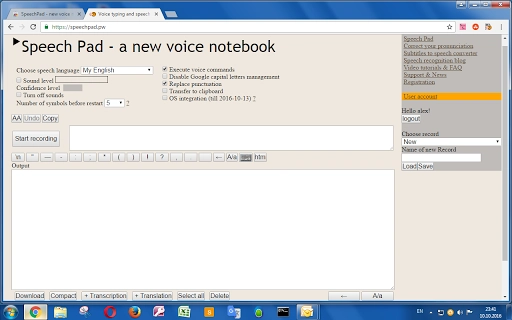
The user interface of Voice Notebook is designed for simplicity and accessibility, prioritizing ease of use across different device types. The main screen displays a clean text editor with a microphone icon prominently placed, indicating active recording mode. Navigation is intuitive, allowing users to start, pause, and stop transcription with minimal effort.
The workflow begins with launching the app, selecting the input source (microphone or file), and initiating transcription. Once text appears, users can interact with it using voice commands or standard keyboard input. The app appears to support seamless transitions between voice input and manual editing, enhancing overall productivity.
However, exact performance details such as CPU or RAM usage were not specified by the developer. Performance observations are based on general software behavior patterns. Stability during extended use or in low-bandwidth environments was not confirmed.
The application’s reliance on real-time processing may affect responsiveness depending on system resources and internet connectivity. Users should expect consistent behavior across supported platforms, though individual experiences may vary based on device capabilities.
Compatibility & System Requirements
Voice Notebook is compatible with Windows, Mac, Chrome OS, Android, and iOS, offering broad cross-platform support. The software is available as a desktop application and mobile utility, allowing users to access their notes across devices. The installation size is 4.8 MB, indicating a lightweight footprint that should not strain system resources.
The software version is 2.0, suggesting an updated release with potential improvements over previous iterations. Exact system requirements were not listed by the developer, including minimum processor speed, RAM, or storage space. Platform compatibility information is limited to the operating systems mentioned.
Users should ensure their devices meet general standards for running modern desktop and mobile applications. The developer did not specify whether the app requires an internet connection for all features or if certain functions can operate offline. Compatibility with third-party apps or file formats beyond audio and video was not detailed.
Pros and Cons
Pros
- Supports real-time voice-to-text transcription across multiple platforms
- Enables conversion of audio files and YouTube videos into text
- Offers voice commands for punctuation and editing, improving workflow efficiency
- Lightweight installation at just 4.8 MB
- Free to download and use, with no cost barrier for entry
Cons
- Exact system requirements were not provided
- Performance metrics such as CPU or RAM usage were not disclosed
- Reliance on internet connectivity for full functionality may affect usability in offline environments
- Limited information on supported languages and transcription accuracy
- Developer did not share details about update frequency or long-term support
FAQ Section
Is Voice Notebook compatible with Windows and Mac?
Yes, Voice Notebook is available for both Windows and Mac operating systems, allowing users to utilize the tool on desktop platforms.
Can I use Voice Notebook offline?
The developer did not specify whether the application supports offline functionality. It may require an internet connection for transcription processing.
Does Voice Notebook support voice commands for editing text?
Yes, the software allows users to insert punctuation and edit text using voice commands, enhancing hands-free productivity.
Is Voice Notebook free to download and use?
Yes, Voice Notebook is available at no cost. There are no subscription fees or hidden charges for accessing core features.
What file types can Voice Notebook convert to text?
Users can convert audio files and YouTube videos into written text. Specific file format support was not detailed by the developer.
Final Thoughts + CTA
Voice Notebook presents a compelling solution for users seeking efficient, voice-driven text input. Its ability to transcribe spoken words in real time, convert audio files, and support voice commands makes it a valuable tool for professionals, students, and content creators. The cross-platform availability and minimal installation size further enhance its appeal.
While some technical details such as system requirements and performance benchmarks were not provided, the core functionality is robust and well-suited for everyday use. The free pricing model lowers the barrier to entry, making it accessible to a wide audience. For those who frequently take notes, draft content, or transcribe recordings, Voice Notebook offers a practical and intuitive alternative to traditional typing.
Download Voice Notebook now to experience seamless voice-to-text conversion across your devices.







